Why AI Applications Need Background Workflows
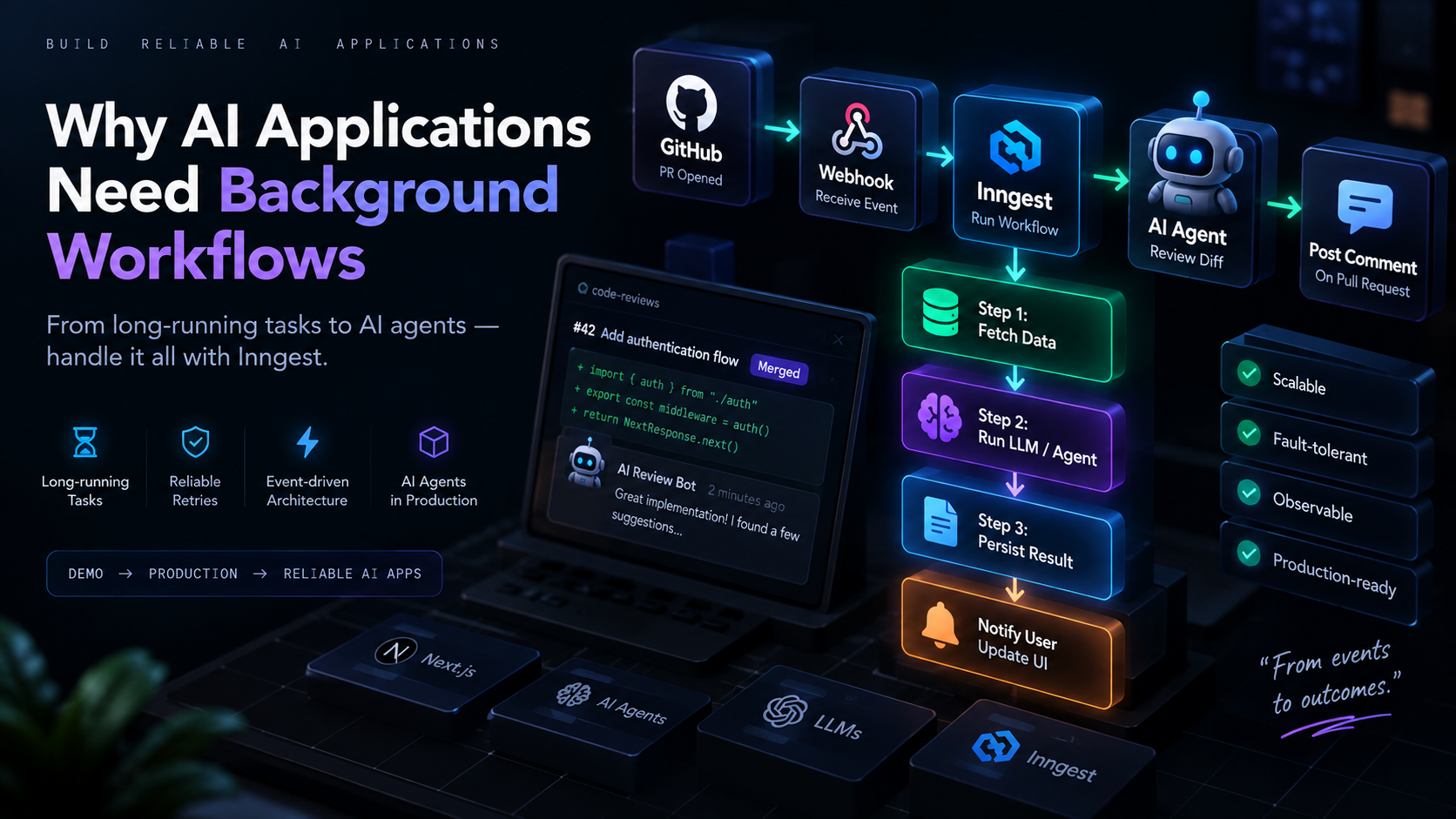
Picture this: a user drops a 40-page PDF into your app and asks for a summary. Or they connect a GitHub repo and expect an AI-generated wiki a few seconds later. Or they open a PR and expect an AI code review comment to show up. Every one of these features looks simple in a demo — and then breaks in production the moment a real document, a real repo, or a real LLM call takes longer than your web server is willing to wait.
This is the problem background workflows solve. Let's walk through why they matter, what they look like, and how a tool like Inngest fits into the picture.
1. The problem with doing everything inside a web request
A typical web request has an implicit contract: the client sends a request, the server does some work, and a response comes back — all within a few seconds. Browsers time out. Load balancers time out. Serverless functions on Vercel, Netlify, or AWS Lambda have hard execution limits, often somewhere between 10 seconds and a few minutes depending on the plan.
That contract works fine for a database lookup. It falls apart the moment "some work" means:
Calling an LLM three or four times in sequence
Chunking and embedding a large document
Cloning a repository and parsing every file in it
Waiting on a third-party API that itself takes 30+ seconds
If you try to do all of that inside a single request handler, you get timeouts, retried requests that duplicate work, and a frontend spinner that either hangs forever or fails with a generic 504. None of this is a coding mistake — it's a mismatch between the request/response model and the actual shape of the work.
2. Long-running AI tasks
AI-native features are disproportionately likely to be long-running, for a few reasons specific to how LLMs and agents work:
Multi-step reasoning. An agent doesn't just answer — it plans, calls tools, reads results, and loops. Each iteration is its own network round trip to a model provider.
Large-context processing. Summarizing a document, indexing a codebase, or transcribing audio means chunking, embedding, and storing — often hundreds of small operations, not one.
Rate limits and latency variance. Model providers throttle you, and response times for the same prompt can swing from 2 seconds to 20 seconds depending on load.
Chained calls across systems. A single feature might touch a vector database, an LLM, a search API, and your own database, each with its own latency.
None of these are edge cases — they're the normal shape of AI product work. Which is why "just await it in the API route" stops being viable almost as soon as a product moves past a toy demo.
3. What background workflows are
A background workflow moves the actual work out of the request/response cycle. The request that triggers the work returns immediately — often just acknowledging "got it, we're on it" — while the work itself runs separately, checkpointed step by step, until it finishes. The result gets delivered later: via a webhook, a database update the frontend polls or subscribes to, a push notification, or a follow-up API call.
The key property isn't just "it's asynchronous" — it's that each step of the workflow is tracked. If the process crashes, gets redeployed, or a single step fails, the workflow doesn't have to start from scratch. That durability is what separates a background workflow from just wrapping your code in setTimeout or firing off a promise you don't await.
4. Synchronous request vs. background workflow
It helps to see the two models side by side:
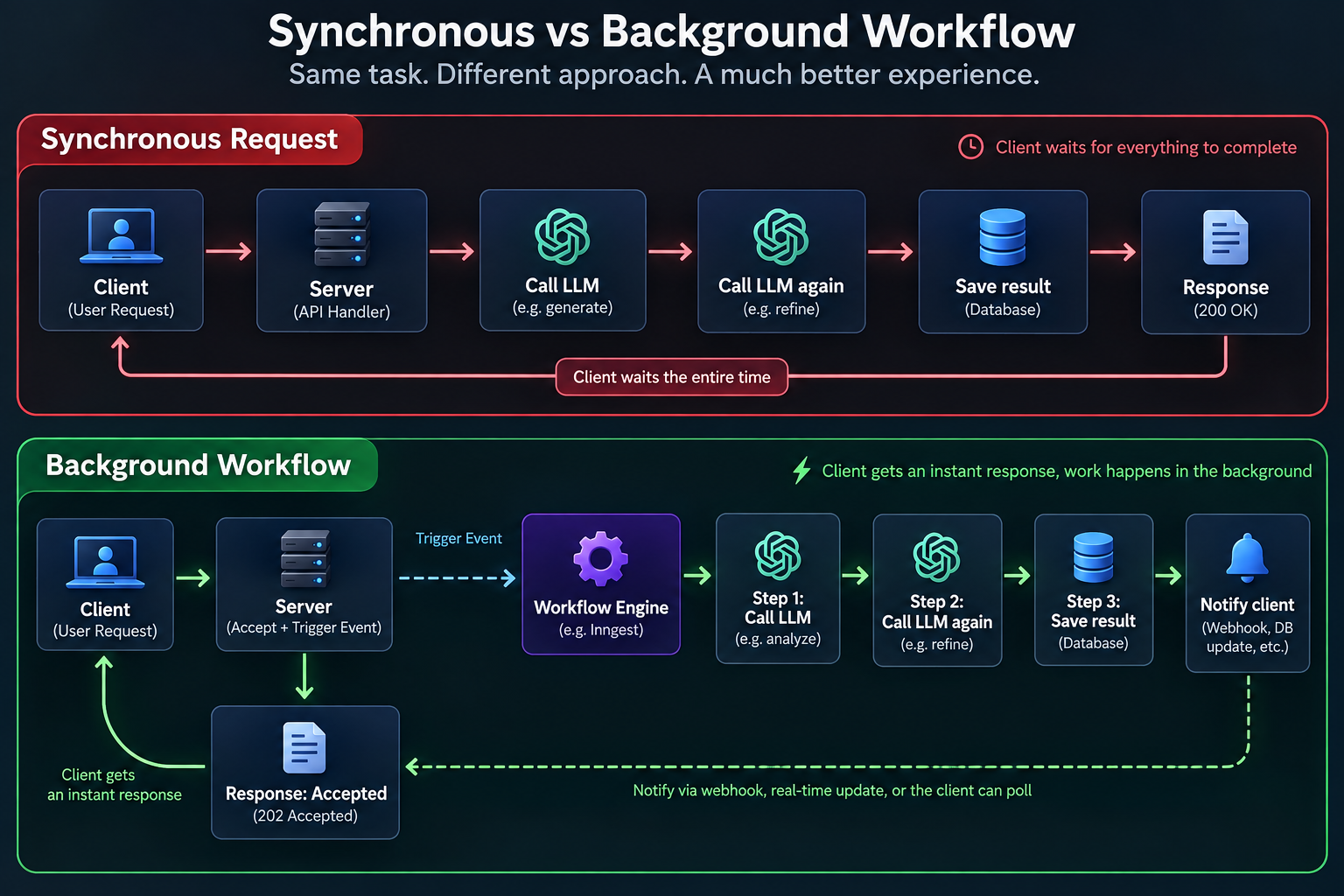
In the synchronous version, the client is stuck holding a connection open for the entire chain. In the background version, the client gets an instant response, and the actual chain of LLM calls runs on infrastructure built to survive retries, delays, and partial failures.
5. Why AI applications specifically need asynchronous processing
Take three common AI product features and look at what they actually require:
Code review agents need to clone or fetch a diff, run static analysis, call an LLM per file or per hunk, and post comments back to a PR — easily 10+ seconds, sometimes minutes for a large diff.
Document processing pipelines need to extract text, chunk it, generate embeddings for every chunk, and write them to a vector store — an operation whose duration scales with document size, not something you can bound in advance.
Agent execution is inherently iterative — an agent might take anywhere from 2 to 50 tool calls to finish a task, and you often don't know which until it's running.
In each case, forcing the work synchronously means either capping functionality artificially (e.g., "only summarize the first 5 pages") or accepting that a meaningful fraction of requests will simply time out. Background workflows remove that ceiling.
6. What Inngest does
Inngest is a background workflow platform built around two ideas: events and durable, step-based functions. Instead of manually wiring up a queue, a worker process, a retry policy, and a way to resume interrupted jobs, you write a function once, and Inngest handles scheduling, retries, concurrency, and state persistence for you.
Practically, this means:
You send an event (a JSON payload describing something that happened) from anywhere in your app — an API route, a webhook handler, a cron trigger.
Inngest picks it up and runs the matching function, even if that function is deployed as a normal serverless endpoint with a short execution limit — Inngest calls it repeatedly, step by step, rather than requiring one long-lived process.
Each
step.run()inside the function is checkpointed. If step 3 fails, Inngest retries step 3, not the whole function from step 1.
This fits naturally with Next.js apps: you define an Inngest function, expose it through a single API route, and Inngest's own dashboard and local dev server handle triggering, logs, and replay.
7. Events and workflow execution
The mental model is: something happens → an event is sent → a function (or several) reacts to it.
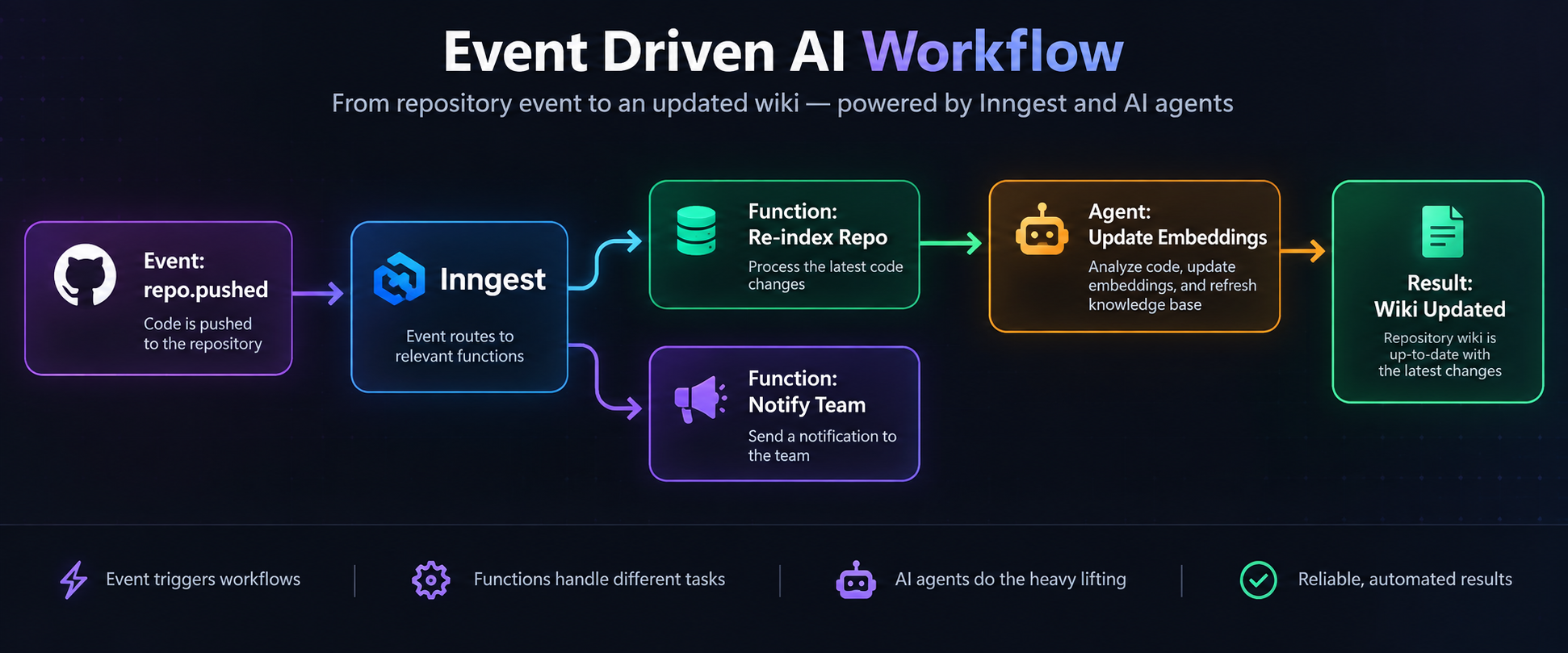
One event can fan out to multiple independent functions — an indexing job and a notification job, say — without either one blocking the other, and without the original caller needing to know both exist. This decoupling is what makes it easy to add new AI-driven behavior later without touching the code that triggers the original event.
8. Retries and reliable execution
LLM calls fail in ways ordinary function calls mostly don't: rate limits, transient timeouts, malformed JSON in a response, a provider having a bad five minutes. A workflow engine treats this as the normal case, not the exception.
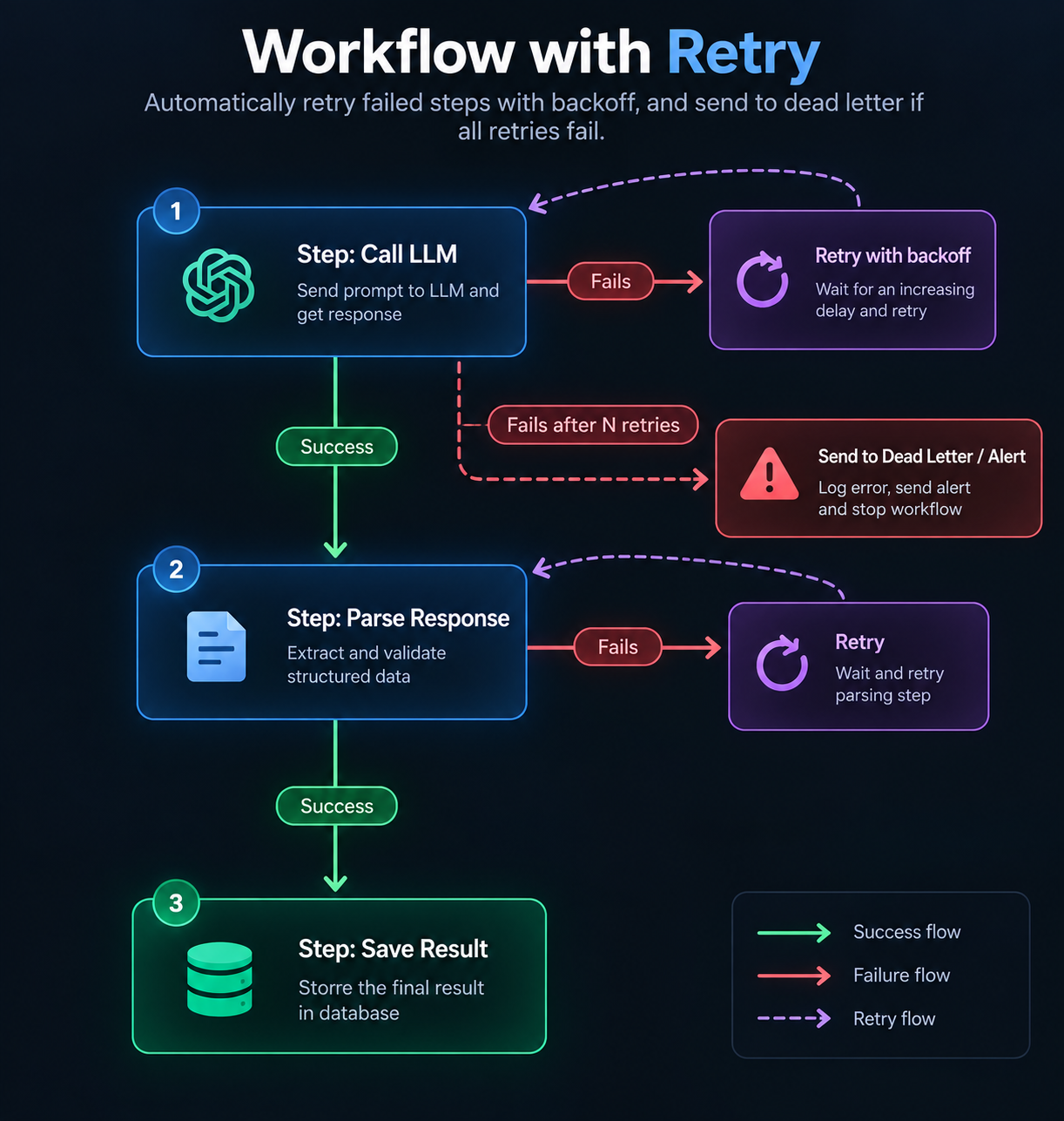
Because each step is independently retried, a flaky embedding call doesn't force you to re-run an expensive upstream LLM call that already succeeded. This is the difference between "retry the whole pipeline and pay for every token again" and "retry just the one step that failed" — a meaningful cost and reliability difference at any real scale.
9. Webhooks triggering AI workflows
Webhooks are one of the most common real-world triggers for AI workflows, because so much useful context arrives as an event from somewhere else: a GitHub push, a Stripe payment, a form submission, a new row in a database.
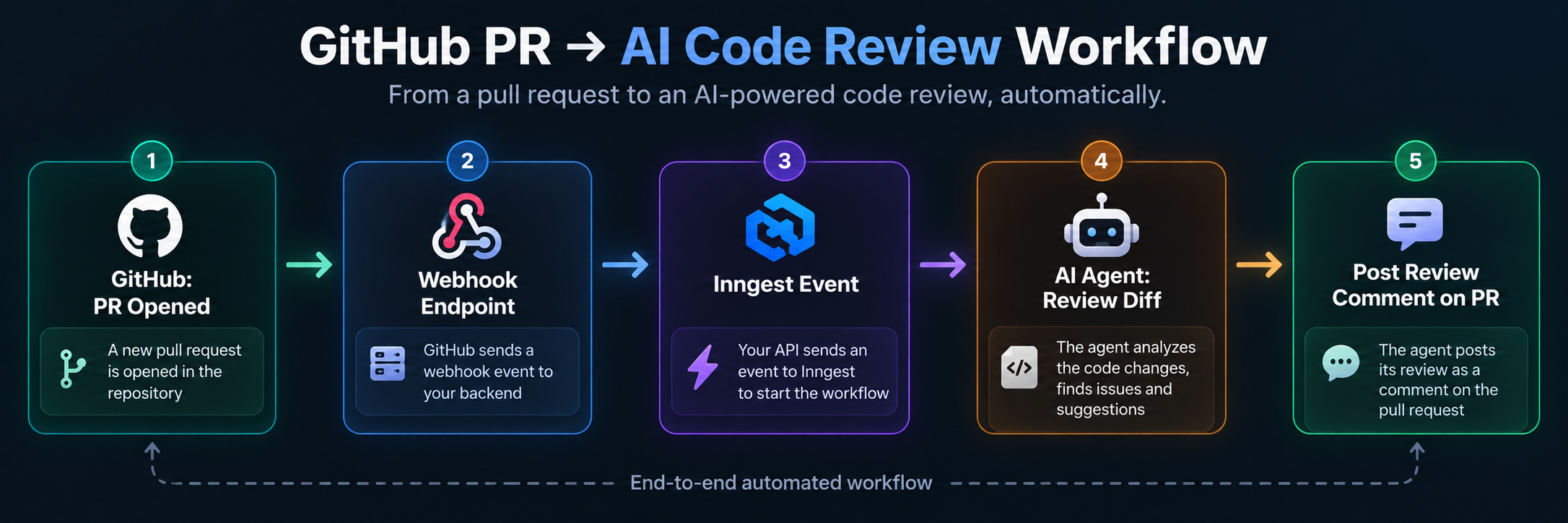
A GitHub webhook fires the moment a PR opens. Your endpoint's only job is to validate the payload and send an event — it returns in milliseconds. From there, Inngest runs the actual review: fetching the diff, running it through an agent, and posting the comment back through the GitHub API, all outside the request/response window GitHub itself is waiting on.
10. Agents inside background workflows
Agents and background workflows solve related but distinct problems: an agent decides what to do next; a workflow engine makes sure each of those steps actually completes, even across failures, redeploys, or long pauses waiting on an external system.
In practice, an agent's tool calls map naturally onto workflow steps — step.run("call-tool-x", ...) — so the agent's reasoning loop gets the same retry and checkpointing guarantees as everything else in the pipeline. If an agent is in the middle of a 20-step task and the underlying function gets redeployed, a durable workflow resumes where it left off instead of restarting the agent's entire reasoning chain from step one.
11. A complete Next.js + Inngest implementation (running example)
Everything above is easier to trust with one example carried all the way through, end to end. Here's a single running example — a GitHub PR opens, and an AI agent reviews it — implemented as an actual Next.js + Inngest app, not pseudocode.
Step 1 — the Inngest client
// lib/inngest/client.ts
import { Inngest } from "inngest";

export const inngest = new Inngest({
  id: "ai-code-reviewer",
});
Step 2 — the webhook route that receives the GitHub event
This route does almost nothing on purpose. It verifies the payload and hands off to Inngest — it should return in milliseconds, regardless of how long the review itself takes.
// app/api/webhooks/github/route.ts
import { NextRequest, NextResponse } from "next/server";
import { inngest } from "@/lib/inngest/client";
import { verifyGithubSignature } from "@/lib/github/verify";

export async function POST(req: NextRequest) {
  const rawBody = await req.text();
  const signature = req.headers.get("x-hub-signature-256");

  if (!verifyGithubSignature(rawBody, signature)) {
    return NextResponse.json({ error: "Invalid signature" }, { status: 401 });
  }

  const payload = JSON.parse(rawBody);

  if (payload.action === "opened" || payload.action === "synchronize") {
    await inngest.send({
      name: "github/pr.opened",
      id: `pr-${payload.pull_request.id}-${payload.pull_request.head.sha}`, // idempotency key
      data: {
        prNumber: payload.pull_request.number,
        repo: payload.repository.full_name,
        headSha: payload.pull_request.head.sha,
        diffUrl: payload.pull_request.diff_url,
      },
    });
  }

  // Respond immediately — GitHub only waits ~10s before treating this as a failed delivery
  return NextResponse.json({ received: true });
}
Step 3 — the Inngest function that actually does the work
// lib/inngest/functions/review-pr.ts
import { inngest } from "@/lib/inngest/client";
import { fetchDiff, postReviewComment } from "@/lib/github/api";
import { reviewFileWithAgent } from "@/lib/agent/review";

export const reviewPullRequest = inngest.createFunction(
  {
    id: "review-pull-request",
    retries: 3,
    concurrency: { limit: 5 }, // avoid hammering the LLM provider or GitHub API
  },
  { event: "github/pr.opened" },
  async ({ event, step }) => {
    const { prNumber, repo, headSha, diffUrl } = event.data;

    // Step 1: fetch the diff — retried independently if GitHub is slow or rate-limits us
    const diff = await step.run("fetch-diff", () => fetchDiff(diffUrl));

    // Step 2: review each changed file — each file is its own checkpointed step
    const reviews = [];
    for (const file of diff.files) {
      const review = await step.run(`review-file-${file.filename}`, () =>
        reviewFileWithAgent(file)
      );
      reviews.push(review);
    }

    // Step 3: post the combined review back to the PR
    await step.run("post-comment", () =>
      postReviewComment(repo, prNumber, headSha, reviews)
    );

    return { prNumber, filesReviewed: diff.files.length };
  }
);
Step 4 — exposing Inngest in Next.js
// app/api/inngest/route.ts
import { serve } from "inngest/next";
import { inngest } from "@/lib/inngest/client";
import { reviewPullRequest } from "@/lib/inngest/functions/review-pr";

export const { GET, POST, PUT } = serve({
  client: inngest,
  functions: [reviewPullRequest],
});
That's the whole loop: GitHub fires a webhook → the route validates it and sends one event → Inngest runs reviewPullRequest as a series of independently retried steps → the comment lands back on the PR. If review-file-utils.ts fails because the LLM provider hiccuped, only that step retries — the diff isn't re-fetched, and files that already succeeded aren't reviewed twice.
12. Idempotency
Retries are only safe if repeating a step doesn't cause double side effects — two PR comments, two charged API calls, two rows inserted for the same document. This is idempotency, and it matters more in background workflows than almost anywhere else, precisely because retries are automatic and happen without a human watching.
A few practical patterns:
Give events a stable, deterministic ID. In the example above, the event ID is built from the PR ID and commit SHA (
pr-${id}-${sha}), not a random UUID. If GitHub redelivers the same webhook — which it does, regularly — Inngest recognizes the duplicate event ID and skips re-running the function instead of reviewing the same commit twice.Make each step's side effect idempotent on its own.
postReviewCommentcan check "does a review comment already exist for this SHA?" before posting, so even a retried final step doesn't duplicate output.Use upserts, not inserts, for anything written to a database. Writing an embedding for
(documentId, chunkIndex)should overwrite, not append, so a retried embedding step is harmless.Avoid relying on step order for correctness beyond what the workflow engine guarantees. If two steps can run concurrently (like reviewing multiple files), don't let them write to a shared piece of state without an idempotent key.
Idempotency isn't a nice-to-have bolted on later — it's what makes "just retry it" a safe default instead of a source of duplicate charges, duplicate comments, or corrupted state.
13. Observability
A workflow that runs outside the request/response cycle is also, by default, invisible outside the request/response cycle — nobody's watching a spinner, so you need another way to know what happened. This gets more important, not less, as workflows involve LLMs, because LLM steps fail in ways a stack trace alone doesn't explain (a truncated response, a refusal, a rate-limit that looks like a timeout).
What's worth tracking for each run:
Per-step status and duration. Inngest's dashboard shows this automatically — which step ran, how long it took, whether it succeeded, failed, or is retrying.
Input and output at each step, especially the exact prompt sent to the model and the raw response received, so a bad output can be traced back to what actually caused it rather than guessed at.
Retry counts and reasons. A step that silently succeeds on its third retry is a signal — maybe a rate limit needs a longer backoff, maybe an upstream API is degrading.
End-to-end run status, surfaced somewhere a human will actually see it — a Slack alert on repeated failures, a dashboard of "workflows stuck in progress," or a simple
statuscolumn on the record the workflow is updating.
The GitHub PR reviewer above benefits from logging, at minimum, which files were reviewed, how long each reviewFileWithAgent call took, and the raw model output per file — so if a review comment looks wrong, you can find the exact step that produced it instead of re-running the whole thing and hoping to reproduce the bug.
14. When NOT to use background workflows
Background workflows solve a real problem, but they're not free — they add a layer of indirection, a dependency on the workflow engine's uptime, and a delay between "user does something" and "user sees the result." A few cases where they're the wrong tool:
The task genuinely finishes fast and reliably. A single LLM call that reliably completes in 1–2 seconds — a short classification, a one-line rewrite — doesn't need a workflow engine. Just await it in the API route. Adding async infrastructure here adds latency (the round trip to enqueue and later fetch a result) without adding safety.
The user needs the result to continue their next action. If the very next thing the UI does depends on the output — form validation, a live autocomplete — making it async means building a polling or websocket layer just to get back to where a normal
awaitalready was.You're prototyping. Wiring up events, functions, and retry policies before you know whether the feature is worth building is premature infrastructure. Ship the synchronous version first; migrate the slow parts once real usage shows you where the timeouts actually happen.
The operation isn't safely retryable and can't be made idempotent. If a step has an unavoidable side effect that truly cannot be deduplicated or made safe to repeat, blindly wrapping it in a workflow engine's automatic retries can make things worse, not better — that operation needs its own careful, manual error handling instead.
Team or infra size doesn't justify it yet. A workflow engine is one more moving part to operate, monitor, and debug. For a small side project with a handful of users, a simple queue (or even a well-placed
after()/background task in your framework) can be enough until the complexity of failures actually demands more.
The rule of thumb: reach for a background workflow when a task is slow, multi-step, or prone to partial failure — not by default for every AI call in the app.
15. Real-world examples of AI workflows
A few patterns that show up repeatedly once you start looking for them:
Repository ingestion and RAG indexing. Connecting a GitHub repo, cloning it, chunking source files, generating embeddings, and storing them in a vector database is exactly the kind of long, multi-step job background workflows are for — and it's the kind of pipeline that benefits from being event-driven rather than triggered inline: a webhook on every push re-triggers incremental indexing instead of a full rebuild.
Automated code review. A PR-opened webhook triggers a workflow that fetches the diff, runs it through an LLM per file or per hunk, and posts structured feedback back to the PR — useful for review bots, grading tools, or internal quality gates, where the review itself can reasonably take anywhere from a few seconds to a couple of minutes depending on diff size.
Document and knowledge base processing. Uploading a PDF, transcript, or spreadsheet and turning it into searchable, chunked, embedded content is rarely instant, and users are generally fine waiting if the UI tells them it's processing rather than making them stare at a stalled request.
Living documentation. Instead of regenerating an entire wiki or architecture map on every commit, a webhook-triggered workflow can incrementally update just the affected sections — turning a documentation site into something that stays current automatically rather than going stale.
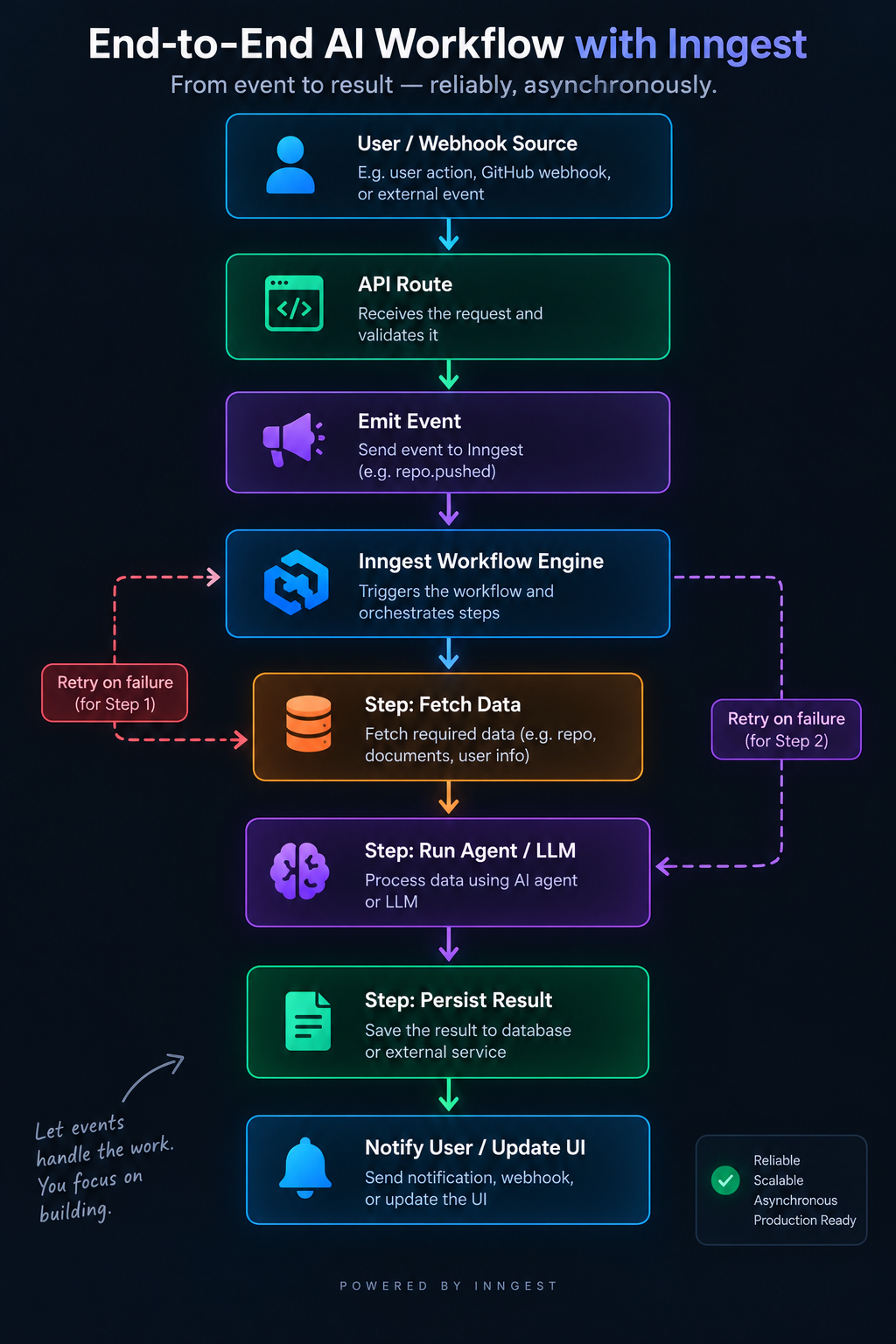
Pulling it together
Here's roughly what an AI application's architecture looks like once background workflows are in place:
The request layer stays thin and fast. The actual AI work — the part that's slow, occasionally flaky, and genuinely multi-step — lives in a workflow engine designed to expect exactly that. That single shift is often what separates an AI feature that works in a demo from one that survives real usage: real documents, real repos, and real, occasionally uncooperative model APIs.